


To Maps Offline είναι από τις χρησιμότερες εφαρμογές για το iPhone που έχουν κυκλοφορήσει!
Ο λόγος; Παρέχει την δυνατότητα να χρησιμοποιείτε το Maps.app του iPhone, χωρίς να είστε συνδεδεμένος σε Wi-Fi (… ή χωρίς να χρεώνεστε kb από την τηλεφωνική σας σύνδεση.)

Πως λειτουργεί:
Cache:
MapTiles.sqlitedb is the primary Cache of Maps.app. With “Save Your MapTiles.sqlitedb” you can Save it as the names says. Below there is the List with all your saved Caches. This is also the Directory to save the Files of MapThis: /private/var/mobile/Library/Caches/MapTiles/
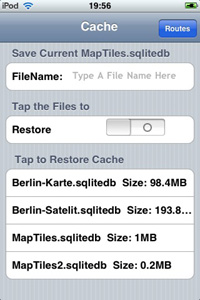
Just Tap on the Row and you have restored you saved Maps.
Saving and Restoring big Files could take a while. 200 MB up to half minute. So dont get crazy.
If you want to delete some Maps, just use the slieder to Tap to Delete.
Routes:
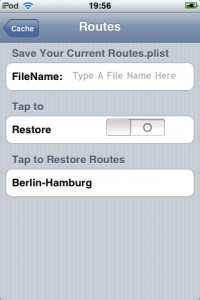
Its the Same Method, just uses another Directory, and you cant delete Route.plist, so at the beginnning you wont see any saved Routes.
EXTRA tip: MapThis (download Maps directly from PC and have direct acces to the Offline Maps)
If you want to have it more comfortable, you can use MapThis for download Maps more effectively.
Credits goes to the creator of MapThis, but i havent found him. i Think its www.in7ane.com.
Here’s a vid to show how to download the map: http://www.in7ane.com/iphone/create_map.mov
Basically:
-Search your Location,choose Satelite or Map
-Click Download Map
-Uncheck any Tiles you dont want to download
-Download, convert into iphone sqlitedb format
-Transfer it
From: MapsOffline.wordpress.com


More from Apps

Η εφαρμογή του Netflix για iPhone / iPad σταμάτησε να υποστηρίζει το AirPlay
Η εφαρμογή του Netflix για iPhone / iPad σταμάτησε να υποστηρίζει το AirPlay.... μετά από 6 χρόνια απροβλημάτιστης λειτουργίας. Σύμφωνα με το Netflix, η παύση της υποστήριξης της λειτουργίας AirPlay στα iPhone, iPad και iPod touch οφείλεται σε "τεχνικούς περιορισμούς". Μετά …

Πώς να ενεργοποιήσετε το Dark Mode στο Facebook Messenger
Αν και δεν έχει έχει ανακοινωθεί επίσημα από το Facebook, μπορείτε να ενεργοποιήσετε το Dark Mode στο Facebook Messenger, με έναν πολύ απλό τρόπο: Ανοίξτε μια συνομιλία σας με οποιαδήποτε επαφή σας στο Facebook Messenger και αποστείλτε το emoji του φεγγαριού (🌙). Αμέσως, θα σας εμφανιστεί …
Netflix: Η λειτουργία των Έξυπνων Λήψεων (Smart Downloads) τώρα διαθέσιμη και για χρήστες iOS!
Το Netflix δίνει τώρα τη δυνατότητα και στους χρήστες iOS να χρησιμοποιούν τη λειτουργία Έξυπνων Λήψεων, η οποία διαγράφει ένα επεισόδιο αφότου ο χρήστης το έχει παρακολουθήσει και μετά αυτόματα κατεβάζει το επόμενο, μόλις η συσκευή συνδεθεί σε δίκτυο Wi-Fi. Η λειτουργία των Έξυπνων Λήψεων είναι διαθέσιμη για …
Netflix: Νέα λειτουργία διαμοιρασμού σε Instagram Stories
Τώρα μπορείς να μοιραστείς απευθείας από το Netflix app την αγαπημένη σου σειρά ή ταινία στα Instagram Stories σου! Το νέο αυτό feature είναι τώρα διαθέσιμο για συσκευές iPhone, όπως και όλες τις συσκευές που χρησιμοποιούν λειτουργικό iOS. Σε όλους έχει τύχει να έχουμε κάποιον φίλο που να ζητάει …

To Netflix καταργεί την πληρωμή νέων συνδρομών από την iOS εφαρμογή για να αποφύγει το “χαράτσι” της Apple

Η Epic Games εξέφρασε τη δυσαρέσκεια της για το μοντέλο διανομής των κερδών στα Google Play Store, App Store και Steam πρώτα αποσύροντας τα παιχνίδια της και έπειτα με τη δημιουργία δικού της καταστήματος (Epic Games Store). Δεν είναι, όμως, …






7 Comments
[…] Maps Offline το πρωτοπαρουσιάσαμε πριν από αρκετό καιρό. Πρόκειται […]
Symlink method here
http://iphoneapplication.wordpress.com/category/tips-and-tricks/